 What is OverStream for Overwatch?
OverStream is an innovative solution for streamers, allowing you to integrate advanced features directly into your Overwatch stream. With OverStream, you can enhance viewer interaction, automate OBS settings, and make your stream more professional and engaging. Elevate your streaming quality and take full control of every moment with ease.
Want to see OverStream in action? Visit our live stream on Flank13's Twitch channel to experience the power of OverStream in real-time! Watch how it enhances every match with dynamic overlays, live stats, and seamless scene switching. Check it out now and get inspired to take your stream to the next level!
Key Features of OverStream
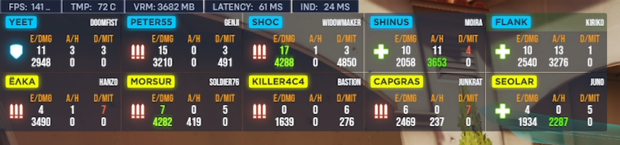
Display Team Roster During Match
Make your stream more informative for viewers. OverStream instantly updates the team roster during the game, displaying crucial data for each player: player name, hero, role, and live stats (eliminations, deaths, assists, damage). Your audience will always know who's performing and who needs support.
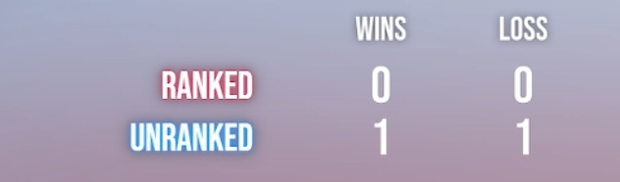
Track Wins and Losses
Let your subscribers track your wins and losses during the stream. With OverStream, you can easily show your overall stats across different game modes (ranked, unranked, arcade), helping you build an exciting stream narrative.
Total Stats for Each Team
Real-time team stats allow your audience to feel the dynamic of the game. OverStream updates this data instantly, providing full team statistics. This feature makes the stream more engaging and allows you and your audience to analyze the match as it happens.

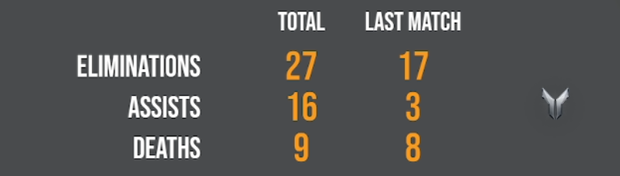
Total Stats for Stream
Want to showcase your performance across the stream or the last match? OverStream displays total eliminations, deaths, and assists for your stream or a specific match. This motivates you to achieve better results and keeps your audience engaged.
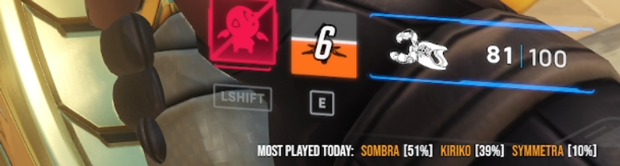
Top Heroes Played
Curious which heroes you play the most? OverStream shows the most played heroes of your stream with percentage breakdowns. This feature adds depth to your stream and helps viewers follow your gameplay style.
Display Match and Queue Type
Keep your viewers in the loop with match details. OverStream shows the current match type (ranked or unranked) and queue type (open or role). This makes your stream more interactive and appealing to both new and regular viewers.

Automatic OBS Scene Switching
Forget manual scene switching! OverStream automatically changes OBS scenes depending on whether you're in a match or in the menu. This feature allows you to fully focus on the game without worrying about technical details. Stream stress-free, knowing that scenes are switched at the perfect moment.
Constant Updates and New Ideas
OverStream is constantly evolving! We regularly introduce new features and improvements based on the latest feedback and trends. Stay ahead with the cutting-edge tools that help you create even more engaging and dynamic streams.
How to Get Started
- Register with your Twitch account — it only takes a few clicks, and you're ready to take your streaming to the next level.
- Install Overwolf and our "OverStream Live" app — the app ensures integration between Overwatch and OBS, making your stream more professional.
- Get your unique access key from this portal.
- Use the key in the Overwolf app to activate OverStream.
- Subscribe to Flank13's Twitch channel, and all OverStream features will be unlocked for subscribers only.